

In this post, I’ll explain why you might want to use saturation during the mastering stage, how it affects your audio, and how I personally approach it in my mastering workflow.
Do You Really Need Saturation in Mastering?
Saturation is not something you necessarily need on every track. Applying saturation simply because it is part of your usual mastering chain is not always the right approach.
Sometimes, the final mix already contains enough saturation, harmonics, and character. Adding more saturation in these situations might actually do more harm than good.
However, in many cases, I find that carefully applied saturation can significantly improve the overall sound of a master.
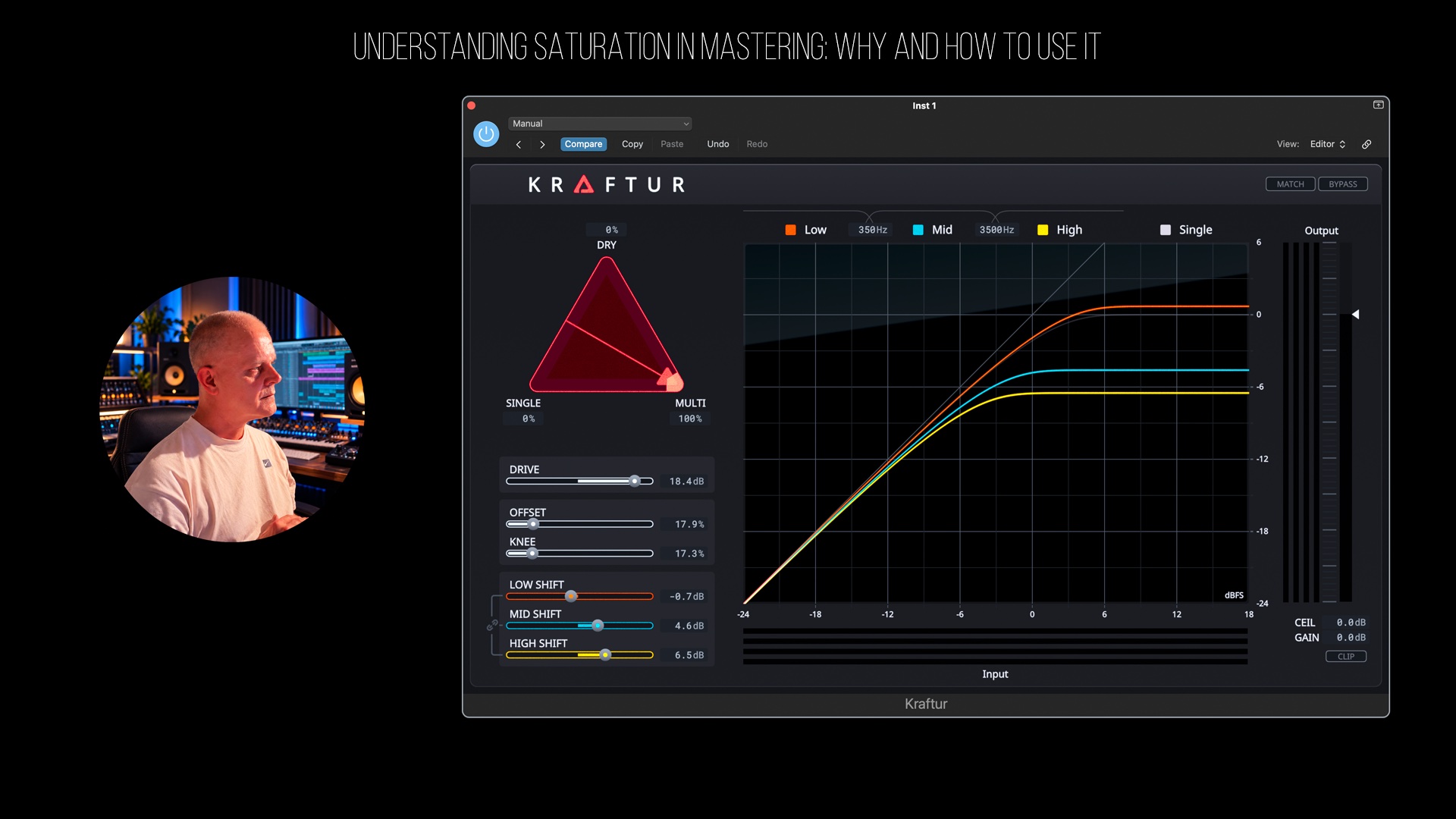
In my personal workflow, I often place a saturator at the very beginning of my mastering chain. For this demonstration, I’ll be using Soundtheory Kraftur, one of the most flexible saturation plugins I’ve worked with. I also really like FabFilter Saturn, but Kraftur offers some particularly interesting possibilities when it comes to shaping harmonics and dynamics.
What Exactly Is Saturation?
Saturation is essentially a form of nonlinear distortion that introduces additional harmonics into an audio signal.
It can be used to add warmth, character, texture, fullness, and density to your music. Depending on the type of saturation and how aggressively it is applied, it can subtly enhance a mix or dramatically change its sonic character.
One of the most important things to understand is that saturation generates harmonic content.
Depending on the saturation algorithm, it can introduce even-order harmonics, such as second-order harmonics, or odd-order harmonics, such as third-order harmonics. Most saturators generate a combination of both, although the balance varies depending on their design.
These additional harmonics can influence how we perceive the tone, presence, and overall loudness of a track.
This is one of the reasons why saturation can be such a powerful tool during mastering.
Why I Like Using Soundtheory Kraftur
One of the reasons I frequently use Kraftur is its flexibility.
The plugin allows you to work with single-band and multiband saturation, giving you precise control over how different frequency regions are affected.
You can also blend the dry signal with the processed signals, making it possible to introduce subtle harmonic enhancement without completely changing the original character of your mix.
Another important advantage is its visual feedback.
Kraftur makes it relatively easy to understand how your saturation settings influence the signal, which is particularly useful when making small adjustments during mastering.
My Personal Goal With Saturation
When I use saturation, I’m not simply trying to make a track sound warmer.
My main goal is to shape the overall sonic character of the master.
I’m looking for:
- More tonal character and harmonic richness.
- Additional texture and density.
- A fuller and more cohesive sound.
- Better perceived loudness without unnecessarily increasing peak levels.
- Greater control over transients and dynamic peaks.
For me, saturation is both a creative and a technical tool.
And this brings us to one of its most interesting characteristics: saturation can increase perceived loudness without necessarily increasing peak levels.
By introducing harmonics and gently controlling transient peaks, saturation can make a signal feel louder and denser, even when the measured peak level remains approximately the same.
Of course, the result depends on the saturation algorithm, the amount of processing, and proper output-level matching.
This is where saturation can become particularly useful in a mastering environment.
How Do I Set Up Kraftur?
Let me explain how I typically approach saturation using Soundtheory Kraftur.
1. Start With the Dry Signal
First, I begin with the dry signal and gradually introduce saturation.
This allows me to hear exactly what the processing is adding to the original mix.
Rather than immediately applying aggressive settings, I prefer to build the effect gradually and listen carefully to how the tonal balance and dynamics change.
2. Adjust the Knee and Offset
One of the things I particularly like about Kraftur is the ability to adjust the knee and offset parameters.
These controls allow you to shape the saturation response and determine how the signal interacts with the nonlinear processing.
You can experiment with different settings depending on whether you want subtle harmonic enhancement or a more aggressive, gritty character.
For mastering applications where I want additional loudness and a slightly more aggressive saturation character, I often prefer a harder knee.
However, this is not a fixed rule. The right setting always depends on the material.
3. Experiment With Multiband Saturation
Kraftur offers additional flexibility through its multiband processing.
In multiband mode, you can adjust the saturation applied to different frequency regions, including the low, mid, and high bands.
This is particularly useful because not every frequency range benefits from the same amount of saturation.
For example, you might want to preserve a clean and controlled low end while adding more harmonic density to the midrange or additional presence to the higher frequencies.
The ability to process these regions independently gives you much greater control over the final result.
When switching to single-band processing, the saturation affects the full frequency spectrum rather than separate frequency regions.
You can also adjust the output level to compensate for any gain changes introduced by the processing.
I strongly recommend comparing the processed and unprocessed signals at matched loudness levels. Otherwise, it is easy to mistake an increase in volume for an actual improvement in sound quality.
Saturation Also Affects Dynamics
Another important aspect of saturation is its influence on dynamics.
Saturation does more than introduce harmonics. Depending on the algorithm and drive level, it can also reduce transient peaks and compress the dynamic range of the signal.
This can make a mix feel tighter, denser, and more controlled.
In electronic music, particularly melodic techno and trance, this can be extremely useful when trying to achieve a powerful, cohesive master without relying entirely on traditional compression or limiting.
However, too much saturation can also reduce punch, introduce unwanted harshness, and compromise clarity.
The key is finding the right balance between harmonic enhancement, dynamic control, and transparency.
Final Thoughts
Saturation can be an incredibly powerful tool during mastering, but it should always serve a specific purpose.
It is not something that needs to be applied automatically to every track.
For me, the main reasons to use saturation are to introduce harmonic richness, enhance tonal character, increase perceived density, and potentially improve loudness while keeping peaks under control.
Plugins like Soundtheory Kraftur provide the flexibility to achieve these results in a controlled and creative way.
The most important thing is to listen carefully, understand what the saturation is doing, and only apply it when it genuinely improves the music.
Hopefully, this explanation gives you a better understanding of why saturation can be useful during mastering and how you can incorporate it into your own workflow.